Claude Code Usage Monitor

Don't let your agentfall into the dumb zone.
Rufus is the web dashboard Claude Code was missing. Monitor your context window in real-time and keep your agent smart. Track token costs in real-time, organize sessions into folders by project or feature, and set budget alerts.
npm install -g hirerufusrufusrufus init --claude✓ 7-day FREE trial • ✓ No credit card required • ✓ Cancel Anytime
Live Context Monitoring
Don't let your agent fall in the dumb zone.
Monitor context live and get warned before it degrades.
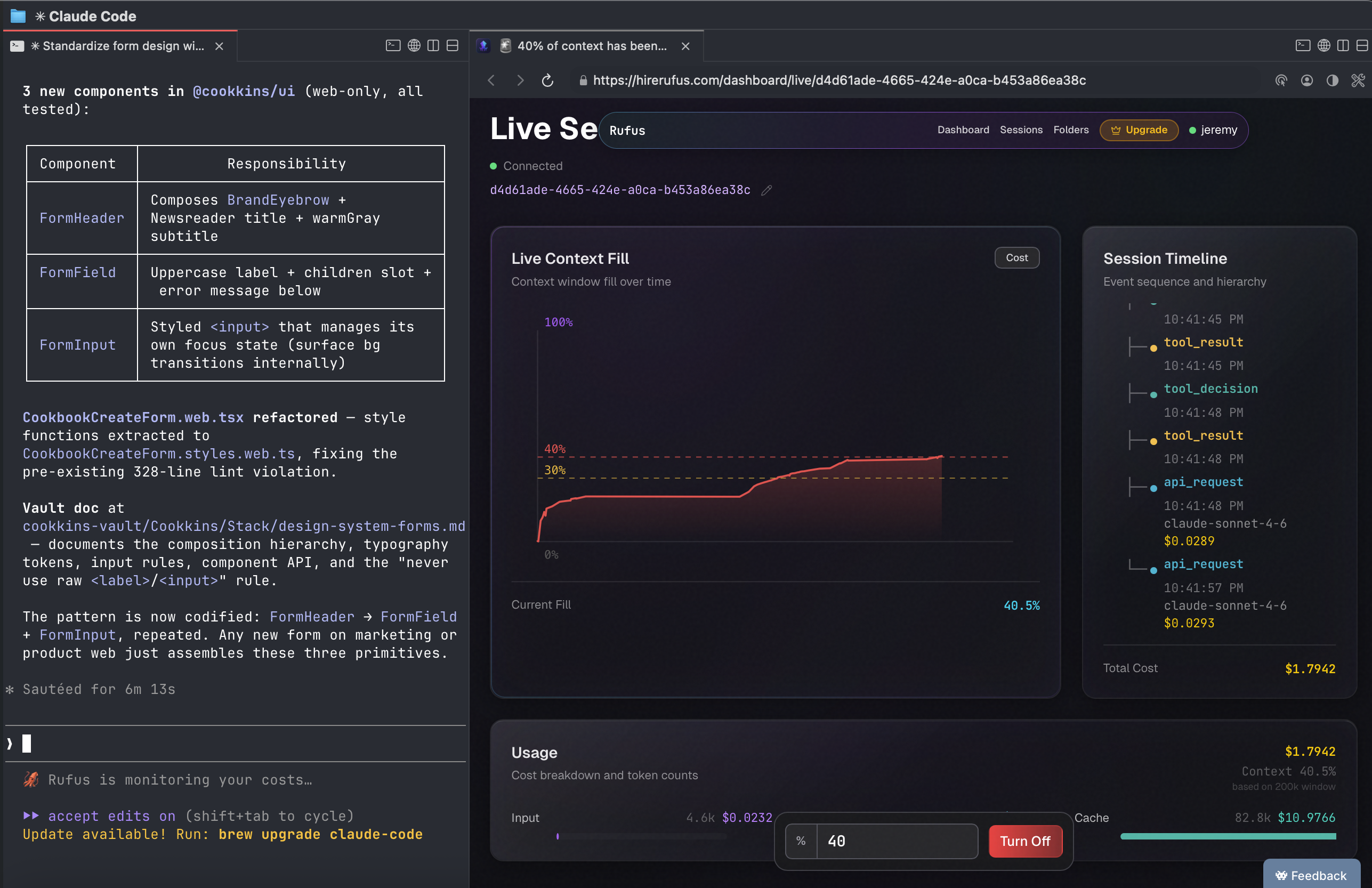
Live context fill chart streamed via WebSocket — see exactly how fast your agent is burning the window.
Set a % threshold and get an in-browser alert before degradation hits — the tab title changes, you can't miss it.
Works alongside cost tracking in every live session. One dashboard, full situational awareness.
The Problem
Your AI Spend Is a Black Box
You're Shipping Blind
How much did that feature cost? That refactor? That entire sprint? You have no idea. Until you do.
AI Is Fast. Your Memory Isn’t.
Shipping with Claude is effortless. But a week later, you have no idea which session contains that feature you built.
You're Burning Money
$32 in bloated context last month. $12 to rebuild something you already had. That’s what happens when sessions aren’t managed.
How Rufus Works
Track Costs. Tag Projects. Bill Accurately.
Install (30 seconds)
npm install -g hirerufusrufusrufus init --claudeCode Normally
Use Claude Code like you always do.
Costs Track Automatically
See real-time spend per session.
Organize your sessions
Group your sessions by feature, project, or client. Folders work for any workflow.
Features
Everything You Need to Stop Flying Blind
Real-Time Cost Tracking
See AI costs burn as you code.
Organize your Sessions
Give an alias to a session. Group sessions together. See overall costs and usage.
Prove Not Tell
Check your average token usage or costs in your dashboard. Show you are building by sharing your heatmap.
Email Alerts
Get notified when costs spike. Set a threshold on a session and we do the rest.
Session History and Analytics
See every coding session and get and analytics report
Context Window Monitoring
Watch context fill live. Set a threshold and get warned before your agent degrades — no more silent failures.
Who Uses Rufus
Made for people who ship, not just talk about it.
For Freelancers
Bill Every Dollar
Stop eating AI costs. Track usage per client. Copy invoice lines with one click. Recover $100-200/month you're currently losing.
For Builders
Build. Track. Ship.
When you're building fast with AI, costs pile up quietly. Get full visibility into your sessions so you always know what you're spending to ship.
For Teams
Make Progress Visible
No standups. No status reports. No guessing who’s doing the work. The heatmap shows the builders.
Questions?
- Do you store my prompts or code?
- Never. Rufus only sees metadata: tokens used, model, timestamp. Your prompts and code never leave your machine.
- Does Rufus slow down my coding?
- No. It runs entirely in the background with zero latency. You won't even notice it's there.
- How does the free trial work?
- You get 7 days of unlimited usage, no credit card required. After that: $29/month or $69/quarter (save $18). No plan, no new sessions tracked.
- How accurate are the cost calculations?
- Very accurate. We capture usage data directly via OpenTelemetry and apply real-time pricing from Anthropic.
- Can I group sessions together?
- Yes. Folders let you group sessions however you like: by project, client, sprint, anything. You get aggregated usage and cost at the folder level, not just per session.
Stop Guessing. Start Tracking.
Your AI tools cost money. You should know exactly how much.
npm install -g hirerufusrufusrufus init --claude✓ 7-day FREE trial • ✓ No credit card required • ✓ Works with Claude Code • ✓ Cancel anytime